 PRIME MOTION
Reading the position display
The strip across the top of Control is the position readout, sometimes called the DRO (digital readout). It is the first place to look before any move.

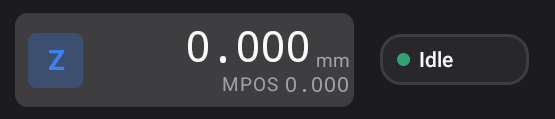
Two positions for every axis
Every axis has two numbers, because there are two coordinate systems:
- Machine position (MPos) — where the machine is in its own frame, measured from the origin it set when it homed. It does not change when you set work zero.
- Work position (WPos) — where the tool is relative to the work zero you set on your stock. Your program's coordinates are work coordinates:
X0 Y0in a program means work zero.
WPos / MPos at the left chooses which one is the large number. The small line under it in each axis box is the other, labelled MPOS or WPOS. Prime Motion remembers your choice.
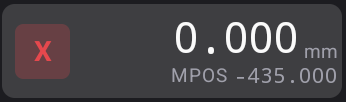
Both numbers are in your preferred units, to the number of decimal places set by DRO Decimal Places (three in millimetres and four in inches by default). Both are in Settings → General.
The work system chip
The chip at the far left names the active work coordinate system: G54 by default, up to G59 on Grbl and G59.3 on grblHAL. Tap it, or long-press it, to open the Work offsets drawer and switch to another system; see Work coordinates.
It can also warn you:
| Chip shows | Meaning |
|---|---|
| G54 | The controller has reported G54 as the active system |
| G54? | The datum is in doubt: something may have changed it since it was last confirmed. Check work zero before cutting |
| WPOS | The controller has not yet said which system is active. Zeroing refuses until it does |
| +G92 (small, amber, under the chip) | A temporary G92 offset is in effect on top of the active system |
The state tag
The tag at the far right is the controller's own state:
| Tag | Dot | Meaning |
|---|---|---|
| Idle | green | Ready and not moving |
| Run | green | Running a program |
| Jog | grey | Jogging |
| Hold | amber | Paused by Hold |
| Home | grey | Running a homing cycle |
| Alarm | red | Stopped itself; see After an alarm |
| Door | red | The safety door input is open, or the controller has parked a held job; see Hold |
| Check | grey | In check mode: reading the program without moving |
| Sleep | grey | Asleep |
| Tool | grey | Waiting for a tool change |
| Unknown | grey | Connected, but no state reported yet |
| Offline | grey | Not connected |
In landscape
The readout runs across the top of the screen in landscape too, with the axis boxes given more room. See Portrait and landscape.