 PRIME MOTION
Feed and speed overrides
Overrides let you change how fast a job runs while it is running, without stopping it or editing anything.
Overrides appears in the action row while a job is streaming or held. It opens a drawer built around the machine's three live percentages — every number shown is what the controller reports, not a tally the app keeps.
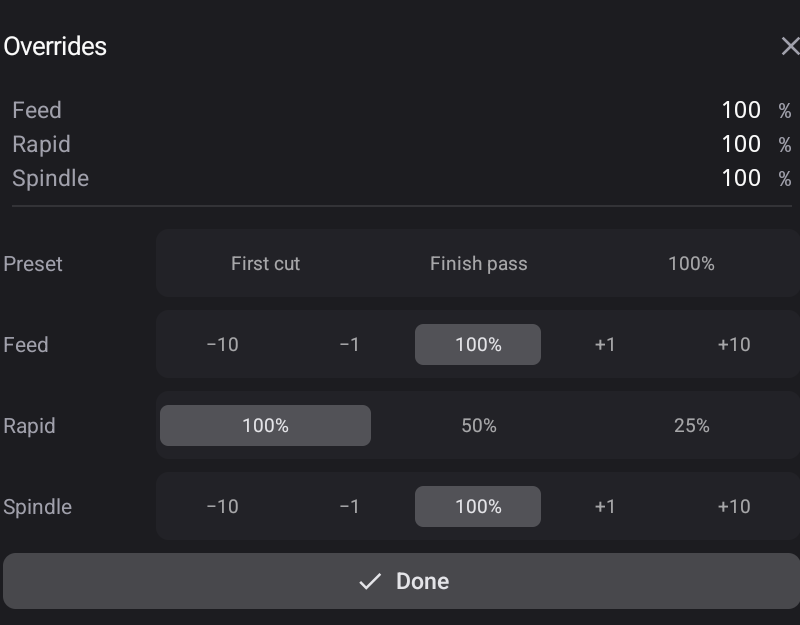
| Row | What it trims |
|---|---|
| Feed | Cutting feed rate — steps of −10 / −1 / 100% / +1 / +10 |
| Rapid | Non-cutting moves — the controller's three levels: 25% / 50% / 100% |
| Spindle | Spindle speed — the same −10 / −1 / 100% / +1 / +10 steps |
Changes take effect immediately — the controller applies them in real time, without pausing or reloading. Done closes the drawer; the overrides themselves commit nothing and stay as you left them.
Presets
One tap sets all three together:
| Preset | Sets |
|---|---|
| First cut | Feed 60%, rapids at a quarter, spindle 100% — the pass where a wrong datum shows itself, with time to reach the stop |
| Finish pass | Feed 80%, rapids full, spindle 100% — eased feed for surface finish |
| 100% | Everything back to programmed |
A preset is an action, not a state — the machine reports percentages, not which preset produced them.
When to reach for it
Something sounds wrong. Chatter, a strained note, a cut that is clearly loading the machine harder than it should. Dialling the feed back is faster than stopping, and it tells you something: if it sounds right at 70%, the programmed rate was too high.
A first cut in unfamiliar material. Start below programmed and bring it up as you gain confidence — that is what the First cut preset is for.
Watching a fussy section. Slow it through the awkward part and return to 100% afterwards.
When the control disappears
If you have never seen it at all, it is switched off — see Settings → Sender.