 PRIME MOTION
Recovering an interrupted job
A four-hour job that dies at hour three is the worst thing that happens in this hobby. Job Recovery exists so that it does not cost you the whole part.
Find it under Wizards → Job Recovery.
How this differs from Job History
They look similar and they are not the same thing at all. They read two different records, written at different times, for different purposes.
| Job history | Job recovery | |
|---|---|---|
| Written | Once, when the job ends | Continuously, while the job runs |
| Holds | File, outcome, line count, duration | Line reached, work position on all three axes, machine position on all three axes, feed rate, spindle speed and direction, every override percentage, and project context |
| Answers | What happened? | Where exactly was the tool, and in what state? |
| Purpose | A record | Resuming |
History is a receipt. Recovery is a live snapshot, updated as the machine works, kept precisely so that a run nobody got to close cleanly can still be picked up.
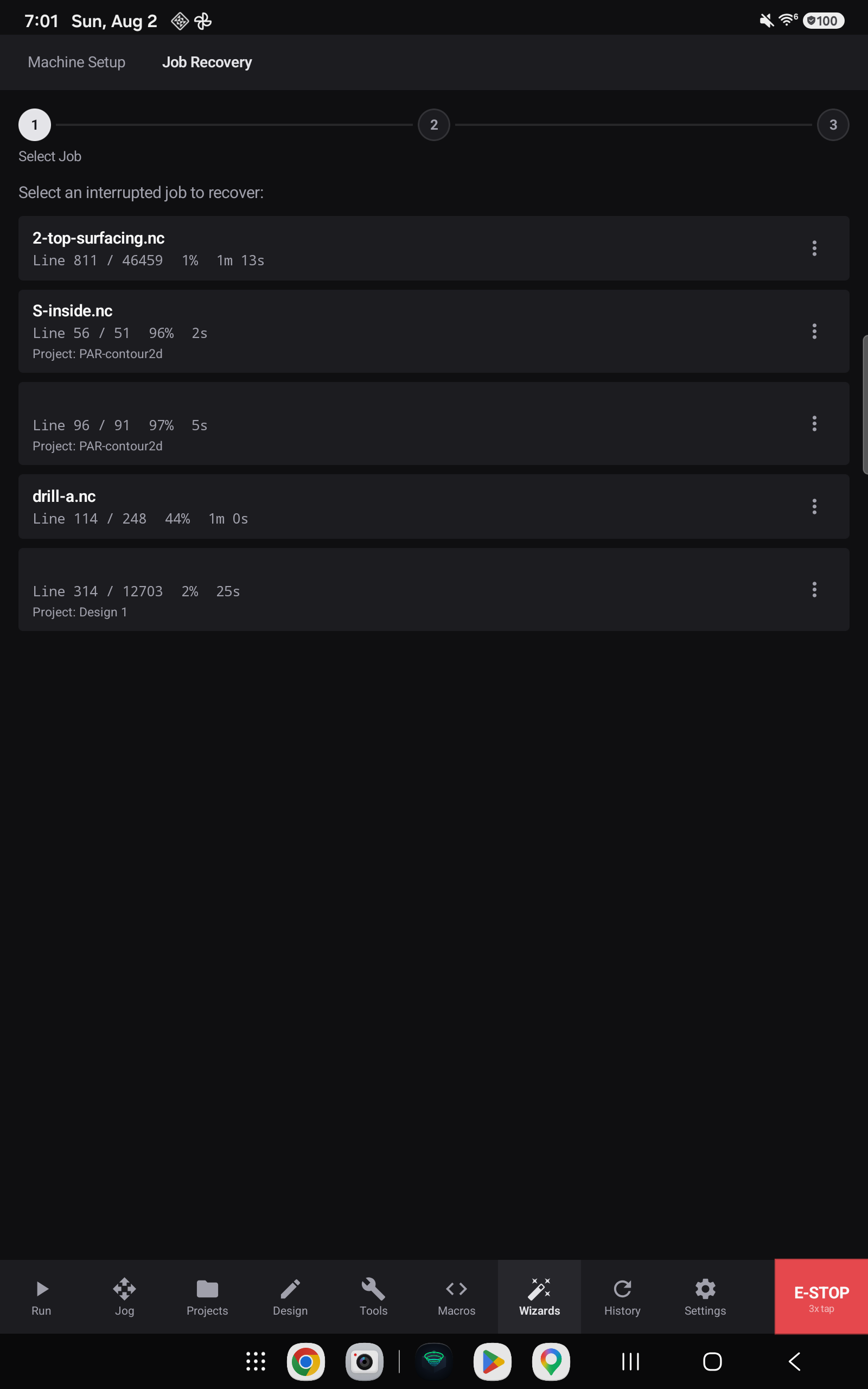
Step 1 — choose the job

Each entry shows the program, how much of it ran out of the whole, how far through that was as a percentage, and how long it ran. Jobs that were part of a project also name the project, so a multi-file run tells you which operation stopped.
Underneath, each entry names the file line the resume will start from. That is a line number in the program as you would see it in a text editor — blank lines and comments included — so it is usually a larger number than the count above it, which only counts lines the machine actually executes. The two are different measures of the same moment, and both are worth having: one tells you how far the job got, the other tells you exactly where it will pick up.
Steps 2 and 3 — prove the coordinate system


The wizard will not let you resume until two things are true: the machine is homed, and work zero is set.
This is not bureaucracy. The saved position is a set of coordinates, and coordinates only mean something inside the coordinate system they were recorded in. Resume against a machine that has been re-homed differently, or with work zero set somewhere else, and the tool goes to numerically the same place — which is physically the wrong place, at rapid, into your workpiece.
- Home the machine if it is not homed. Recovery checks, and says so plainly when it is satisfied.
- Set work zero back where it was for the original job. This is the step that needs your care — the app can confirm a work zero exists; it cannot know it is the same one.
- Continue to Run loads the program at its recovery point.
What resuming actually does
Continue to Run takes you to the Run screen with the program loaded at its recovery point. You can tell you are in a recovery rather than a fresh job at a glance, because the green button no longer says Start:

The program continues from the line the snapshot recorded, so the cutting already done is not repeated.
Related
- Job history — the record, as opposed to the resume point
- The Run screen
- Setting work zero