 PRIME MOTION
Settings — Work Offsets
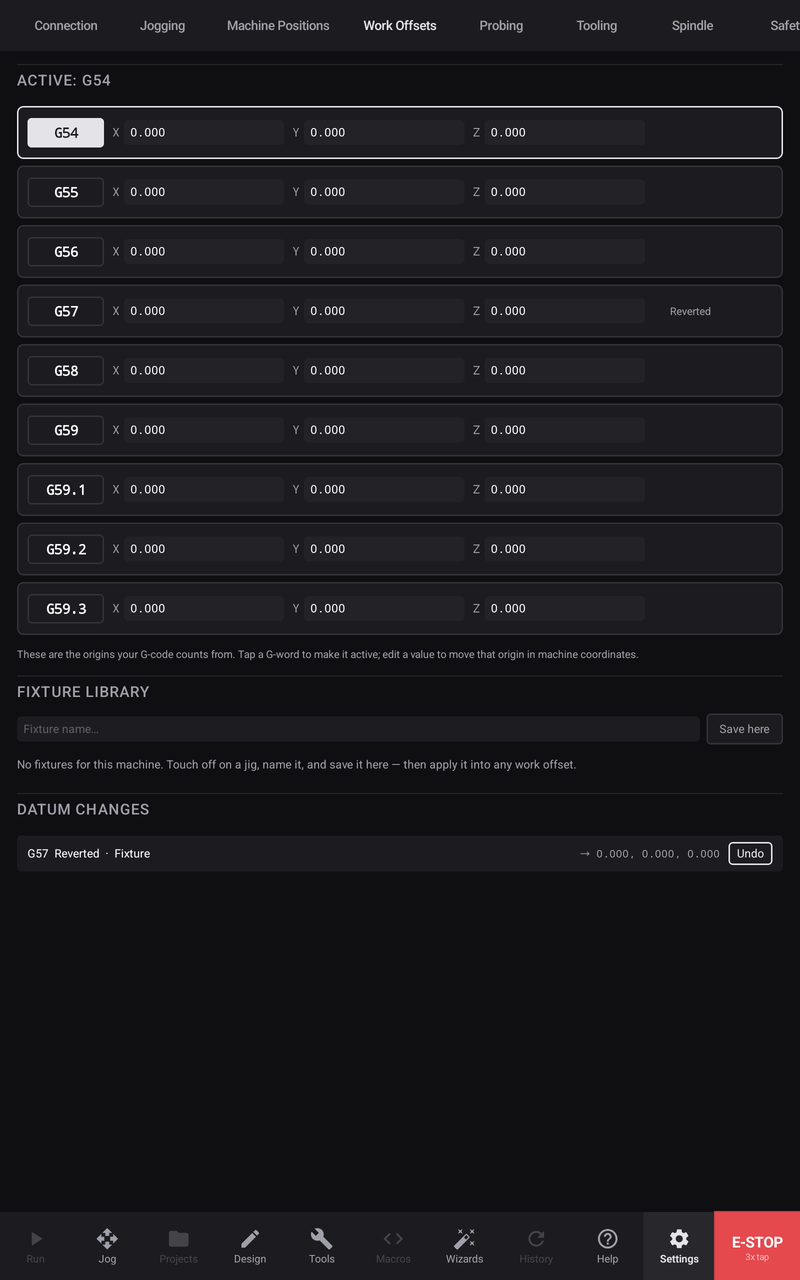
The controller keeps six work coordinate systems, G54 through G59. This tab shows all six as the controller reports them — these are the origins your G-code counts from.
The six systems
Each row is one system: its G-word, and its origin in machine coordinates.
The active one is marked. Tap another system's G-word to make it active — the same switch a G55 in a program performs, done deliberately.
Edit a value to move that origin, in machine coordinates. This is the direct route; most of the time you will set an origin by zeroing or probing at the machine instead.
Where the app knows how an origin last changed — a zero, a probe cycle, an edit here — the row says so, so a number is never just a number.
The temporary offset — G92
If a G92 offset is stacked on top of the active system, it appears under the six rows, with a control to clear it. A G92 shifts every work coordinate without touching the stored systems — which is exactly why one you did not know about is worth surfacing. The position readout shows +G92 beside the datum label while one is active.
Fixture library
A fixture you use repeatedly — a vise, a jig, a fixture plate — can be saved by name: touch off on it, then Save here. Applying a saved fixture writes its origin into whichever work offset system you choose, so returning to a known setup is one action rather than a fresh touch-off.
Datum changes
Every change to a work datum is recorded — what changed, on which system, and when — and listed newest first. A change can be undone from its row, which restores the previous origin.
The list shows the newest changes and says how many more exist, so a bounded list never reads as a complete one.