 PRIME MOTION
Manual spindle and coolant
A program starts and stops the spindle itself. Spindle in the command rail on Control is for the times you want it by hand: warming up a spindle, checking it runs true, blowing chips with the coolant, or testing a speed.
It needs the machine connected and no job running. While a job runs, the program owns the spindle and coolant; when a job starts, the drawer closes.
The Spindle drawer
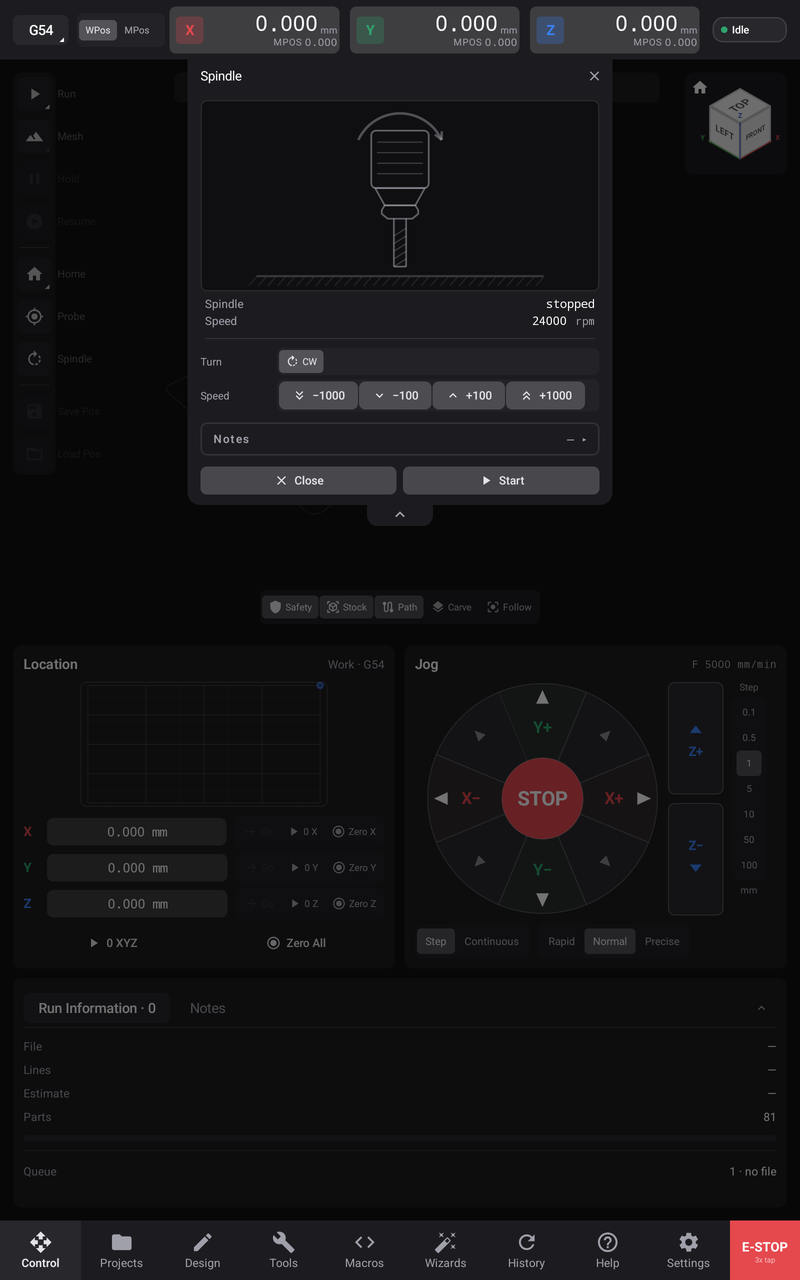
What the machine reports is at the top:
| Row | Shows |
|---|---|
| Spindle | CW, CCW or stopped, as the controller reports it; — when it reports nothing |
| Speed | The speed in rpm, or — with set on the router when the speed is set on a dial |
| Coolant | What is flowing: flood, mist, or both |
Below that are the controls:
- Turn — CW (clockwise, the normal direction). CCW appears only when Reverse (CCW) is on in Settings → Spindle, because the machine must be wired to reverse. Choosing a direction sends nothing by itself; it applies at Start.
- Speed — −1000, −100, +100 and +1000 step the speed within your spindle's range. They need a spindle the controller can set the speed of.
- Coolant — Flood, Mist and Off. The coolant row appears only when Coolant Controls is on in Settings → Spindle and the machine has those outputs.
Start and stop
- Clear the area around the cutter.
- Choose CW and set the speed.
- Tap Start three times, each within a second of the last. The button counts down: Start — 2 more, Start — 1 more.
- The spindle starts and the button becomes Stop, in red.
- Tap Stop to stop it.
Three taps, like E-STOP, keep a brush of the hand from starting a spinning cutter.
Close and the drawer's × wait while the spindle runs, so the drawer cannot be put away over a turning cutter. Stop the spindle first; stopping is always available.
What it refuses, and why
The drawer's Notes record every command it sent, such as Sent M3 S12000, and every refusal, word for word:
- Not homed — on a machine that needs homing, the spindle waits until it is homed. The drawer says Home the machine to turn the spindle — stop stays available.
- The probe is in the collet — if the tool recorded as loaded is your probe's tool number, the spindle is refused; spinning a probe destroys it. Load a cutter and set the loaded tool in Settings → Tooling.
- A program is running — the program owns the spindle and coolant until you hold, stop or E-STOP it.
Machines with a manual-dial router
Many hobby routers set their speed on a dial on the router itself. For them the controller can switch the router on and off (if it is wired to), but cannot set its speed: Speed reads set on the router, and the speed buttons are unavailable. Set the dial by hand. See Settings → Spindle.