 PRIME MOTION
Rehearsing with Air Run
Air Run runs the whole program with the cutter lifted clear of the work and, by default, the spindle off. The machine traces every move in the air, so you can watch the job's path over your clamps before a cutter goes near them.
What it changes
- Every Z position is raised by the Clearance Height in Settings → Sender: 10 mm by default. A move the program sends to Z0 goes to Z10, and nothing goes below that height.
- The spindle stays off while Suppress Spindle is on (the default): spindle starts are replaced with a spindle stop.
- Moves in machine coordinates (
G53), returns to stored positions (G28,G30) and tool changes are left as they are.
What it does not change
- The machine still moves at the program's own feeds and rapids. X and Y are exactly as the program says.
- Work zero is not changed. Air Run lifts the moves; it does not move your origin.
Check the footprint first
Use Outline for a seconds-long check of the job's XY footprint at safe Z. It does not rehearse the cutting path. Air Run rehearses every move, so allow the time the whole job needs, including tool changes. Neither runs merely because you load a file.
Run a program in the air
- Load the program and set work zero as you will cut it.
- Tap Run in the left command rail, then choose Air Run. This switches rehearsal mode on without starting motion; Air Run is highlighted when you reopen the panel.
- Check Run Information: the file's name now ends in · Air run, and the Notes card says Air run — spindle suppressed with the clearance, such as Z +10.0 mm clearance.
- Reopen Run and choose Start (Start Project for a whole project). Watch the job trace above the stock.
- When it is done, choose Run → Air Run again to switch it off before the real cut.
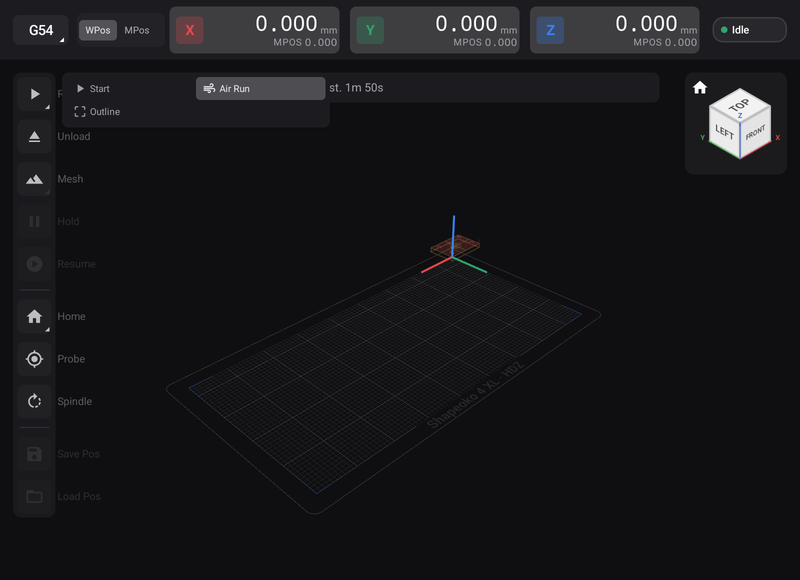
Air Run stays selected for every start until you switch it off. It is the same switch as Enable Air Run in Settings → Sender. It and Mesh exclude each other: switching one on switches the other off.